Ten years ago, when I was working as a research associate in the biotech industry, someone suggested we switch to a digital form of notebooks. At the time, we all thought she was crazy. And, at the time, we were right. No one had smart phones, at least none of us actually working in the labs. Very few even had MP3 players. We weren’t constantly attached to our devices and so the idea of an electronic device replacing our trusty paper notebooks was simply unrealistic.

Over the past decade, many of those early electronic lab notebooks (or ELNs) have come and gone. Their software was too specific and too limited. Those that offered more in the way of convenience or ease of use also came with price tags. Now, software companies have gotten smarter. They offer lighter versions for free, get you hooked on their software and then you can upgrade for a price. They are the new corner dealers, some might say. These newer versions have a lot of promise. They purportedly make your projects more organized, streamlined, easier to search and share, and ultimately, make research better.
Not convinced? Jim Giles wrote this news feature on the promise of ELNs.
When I started my new postdoc position a couple of months ago, my PI mentioned that I could choose my own format for my notebook, paper or digital. I hadn’t even considered an ELN as a possibility, and so I got to work to find the format that would best suit my needs. My requirements were that it be either free or very inexpensive, easy to use (I’m no computer wiz), support and import many different media formats, and have longevity.
That last requirement was a big one for me. I didn’t want to invest time in an ELN, only to have it be obsolete in a couple years and unattainable. These projects take years to complete and small details now may be hugely important later on. I need to be able to access my data for years to come.
By searching “electronic lab notebook”, “ELN”, and “Digital Lab Notebook”, you can quickly become overwhelmed with what is available. If you’re handy with software and HTML, you can even design your own. I’m not that crafty and so I focused on the following options. Each offered a free version. Some even offered interfacing between software on your laptop and apps on your tablet or phone. Most offer access to your notebooks even when you don’t have access to your laptop, either through cloud storage or linked accounts.
In the end, I decided to go with Microsoft OneNote. I’m in a PC lab and the software is supported by my university and the department. It just made sense. There’s a lot to know about this software, more than I’ve even touched on so far. Here’s the basics that I have discovered so far. You can have several “notebooks” and within each notebook, you have sections. Within each section, you can have separate pages. For instance, I have a project page in my primary cell culture section in my experiment notebook. I also have a notebook for notes from meetings and seminars, and another for the lab management tasks such as ordering supplies, inventory, etc. I can put links to protocols and databases right into each page, so the information retrieved is always up to date.
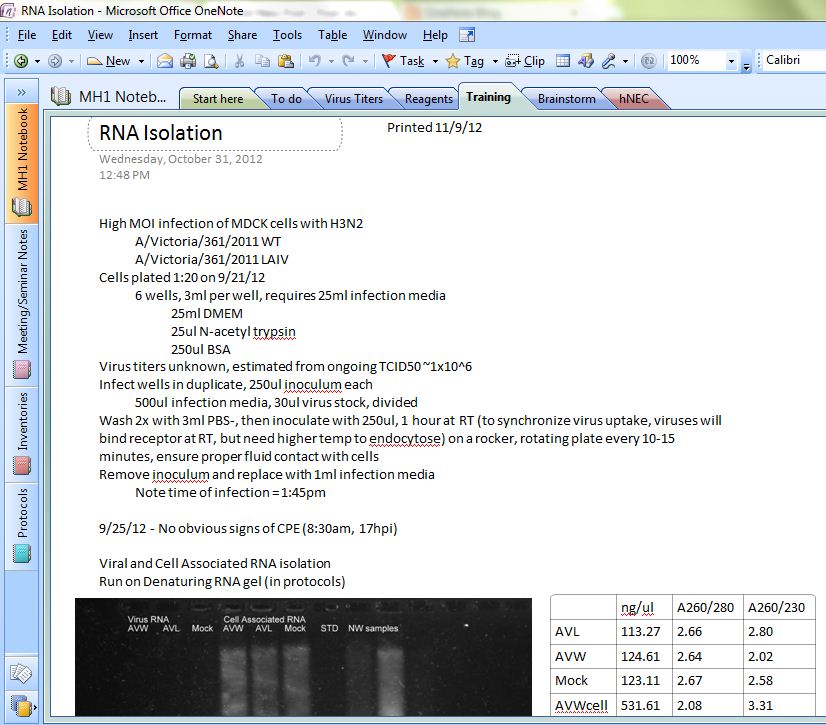
There are some downsides. Once I’ve planned a project, I generally have to print it out anyways so that it is handy when completing the experiment. This results in more notes scribbled on the fly. I can probably just enter these after the fact and somehow just make it traceable that these notes were added, perhaps using different font color. I still feel the need to keep the original notes, though, and so I keep a binder to put these into. One thing I would have liked, in this software, is the ability to scribble on a page. I can get around that using the paint software, but it’s an extra step. Perhaps if I did have an iPad to link to, this would be easier.
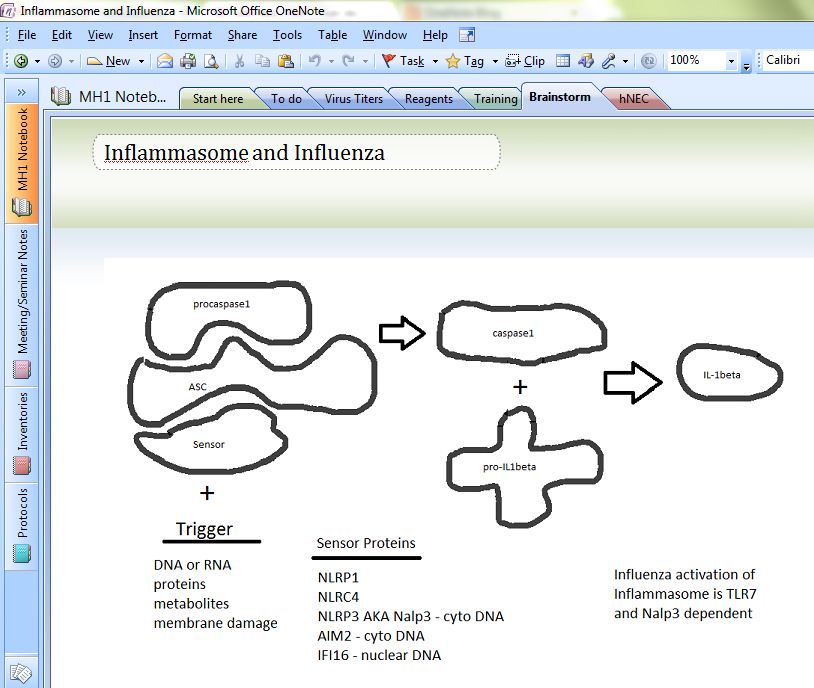
I wouldn’t go into an ELN blindly without having some idea of how you want it organized. If you’re not organized, it won’t magically sort and categorize for you. Spend some time and think about how you want to structure your notebook before starting. OneNote does offer an uncategorized page, but I try not to use this. My desk is messy enough with random pieces of paper, I don’t need my ELN to look like that too. However, it does solve the problem I always faced with a paper notebook in that my projects were always broken up and separated by other projects. With this, all the information pertinent to a project is on the same page.
When I informed my PI that I was going to go the ELN route, he offered one piece of advice. Make sure to print out a hard copy once in a while. No matter what else happens, you can always read paper. So while the ELN may finally become a reality in research labs and make us the most efficient scientists of all time (if you buy into the hype), we may never get away from the paper notebook. Afterall, you can’t argue with its longevity and technical support.
Backup regularly. Cannot stress that enough.
Really enjoying the posts, Fab Grad! How about a longer piece?
Great article. Regarding your last paragraph, I went with LabArchives in part because LabArchives allows you the ability to click to “create an offline notebook” or turn your entire notebook to PDF at any time. (I agree with the backing-up statement). No question ELN is the way of the future.
That’s a great feature of LabArchives that I wasn’t aware of. Thanks for sharing. How’s your experience been using an ELN so far?
In browsing the tools section of OneNote today, I realized there is a way to draw or sketch using the pen writing tool. Also, it shares a feature with LabArchives in that it will publish directly to PDF. Its definitely worth spending some time familiarizing yourself with all the available functions!
it really depends on your method… i can understand the productivity of ideas using electronic devices or digital software, but for me nothing beats paper based notebooks. in my opinion,
the best lab notebook is the notebook that is synonymous with the mind of the writer
I’ve been debating over several different forms of ELN. I’ve been considering OneNote vs Google Keep vs Evernote, but since I’m already familiar with OneNote, your post has just pushed me over the edge and I’m going to start using OneNote as a “diary” of sorts to record even the mundane “split cells today” entry. For my actual experiments, I’ve been using Microsoft Word documents derived from a template and saved on a Sharepoint server for versioning and archival/search capability, but I may re-think that if OneNote can really serve as a bonafide ELN.
Perhaps I’ll resort to using Microsoft Word to generate protocols and scribble my results in OneNote (previously I liked to keep everything together in one place so I have a detailed record of both what I did and the results).
It’s now nearly 5 months since your post – have you found OneNote to be adequate?
Thanks for the comment Harold! I think you will enjoy using it! I should write a new post updating how my ventures with EndNote are going.
I’m still using it as my primary means of record/experiment keeping. I’m finding new tricks along the way too, how to draw in EndNote, for example (which was one thing I thought was missing before!).
I do still go back and forth a bit between Word docs and OneNote, partially because other labmates will share protocols, etc. that they have made in Word. Often, I’ll cut and paste into OneNote to keep everything in one place.
I’m learning new tricks and finding new uses for it all the time. I’ll write a fuller update soon. Good luck with it!
This is a GREAT post while I’m searching around the ‘best’ ELN to start my ELN experience. Thanks a lot for writing the post and all the responses. Hope to hear about the updates of your accumulating experience with OneNote. I’ll definitely give it a shot.
I work for an ELN vendor called IDBS. Our product (E-WorkBook) is being used in a lot of the big pharma companies but does come with a rather significant price tag. The benefits of going with an established dedicated ELN is that the organization is pre-existing for your specific domain and there is no need to go through a bunch of design. The downside of using onenote, evernote, etc.. is that the software doesn’t support digital sign-off and an audit trail so your material cannot be patented (not compliant with 21 CFR part 11 or GXP). Honestly, the background for the compliance is the expensive part. If you have any questions feel free to reach out via our website.
There is also eLabFTW : http://www.elabftw.net
It’s a free and open source lab notebook.
I have been looking for ELNs and few months ago landed on ONENOTE.
I would almost agree that this is the best option available there is for ELNs. Here are my points:
1. As the original poster later realized.. inking and drawing is the internal and integral part of onenote.. so now I can actually sketch my ideas during brainstorming sessions along with my experimental details in the labnotebook…- JUST LIKE A PAPER NOTEBOOK.
2. I love the feature of writing anywhere and drawing anywhere on onenote—JUST LIKE A PAPER NOTEBOOK
3. The “save” location of my labnotebook is my dropbox folder. So now ANY computer in world that has internet and onenote installed.. I can access my labnotebook.
4. Above point also details the idea of having a safe backup… in case your computer fries or if there is a flood :). You always have a backup. I have dropbox on my office pc, my experiment pc, my personal laptop and my backup laptop. this ensures that my labnote book is backed up at 4 places…’without’ any effort. Oh and it is also backed up on the dropbox website. I make changes at one place and it gets automated at all the places instantaneously.
4. I like the feature of “print to onenote” … so now i can print word docs and pdf files to my ELN and write my notes right on top of it.
5. I like the idea of inserting files. I use this to insert excel files where i have stored calculations that I had used at the time of making samples/protocols. So I can open them, recheck or reuse them whenever I want.
6. I do hate the idea of printing my protocols while actually making my samples.. and re-entering my scribbles back into the onenote (with a different font color). I dont know of any way to get around it.
7. For this who like handwritten notes…. well.. I use a tablet pc. That way everything i do is handwritten notes on a digital paper 🙂
These are my points for finally zeroing in on onenote.
anyone has any other comments/suggestions ?
Wow! Great points and tips! I hadn’t even thought of linking it to my dropbox (opening up window – now!). Thanks for your comment and feedback. I have been very pleased with the use of OneNote so far for my ELN. The best part for me is that when I get behind in updating my notebook, it is so much easier to “copy and paste” into OneNote than it is to print, cut, and literally paste into a paper notebook!
Lab archives sucks! There is no warning of a limit size to the pictures you upload. After, the pictures are uploaded, the lab entry freaks out! You can’t edit, delete, copy-paste or anything!!! It is a problem with saving information entered. It does not accept formulas made in Word. Its formula making sucks! This is so frustrating, the customer serive is horible too. Waste of money! Hire a tech person to update it and more money will roll in. If you make a good product, loyal consumers will follow!
I hope you’ll bear with me as I will be plugging my own product, moreover only available on Mac (ah ah, sorry!). But having worked in science for many many years, I have myself struggled with implementing a lab notebook on my computer. In my case, I went with a mix of pure-text markdown entries (in TextMate), converted to html then PDF through some simple scripts. The files organization on disk was codified by experiments and projects. That offered super-speedy search, and all the advantages of a computer (my favorite: copy-paste!). The ability to format in HTML provided also a nice output to paste into a regular notebook. I never needed to write anything with a pen!
Fast-forward a few years, and I actually developed a more user-friendly solution, inspired by my experience. It is called Findings and I have more thoughts on it here, that resonate with your post and the comments: http://cocoamine.net/blog/2014/04/25/findings-your-lab-notebook/
Because of what I am doing, I get a lot of feedback on what people use currently (when they use something), and it’s interesting that OneNote and EverNote come out on top. They are certainly great tools, flexible, with lots of features, and very well supported by a large development team. The only drawback is they remain general-purpose tools, when all would be needed are a few specific features geared towards scientists. Hopefully, Findings or others can get there…
I’m going to lobby for adoption of OneNote by my lab group for a specific project’s ELN. Thanks for posting about this!
I came across elabmanager.com powerful simple and to the point without mess to manage my lab and research with tracking of instrument usage material left in lab and of course organizer for instrument booking.. all what i needed in one package.